
As businesses collect leads through signup forms, newsletters, free trials, and marketing campaigns, email databases accumulate invalid addresses, incorrectly entered email addresses, disposable email addresses, inactive accounts, and outdated contacts. This reduces email list quality and impacts overall campaign performance.
To address this, businesses use email validation. But email validation is not always performed in the same way. The verification process often depends on whether businesses want to prevent bad data during collection or clean existing email databases before campaigns.
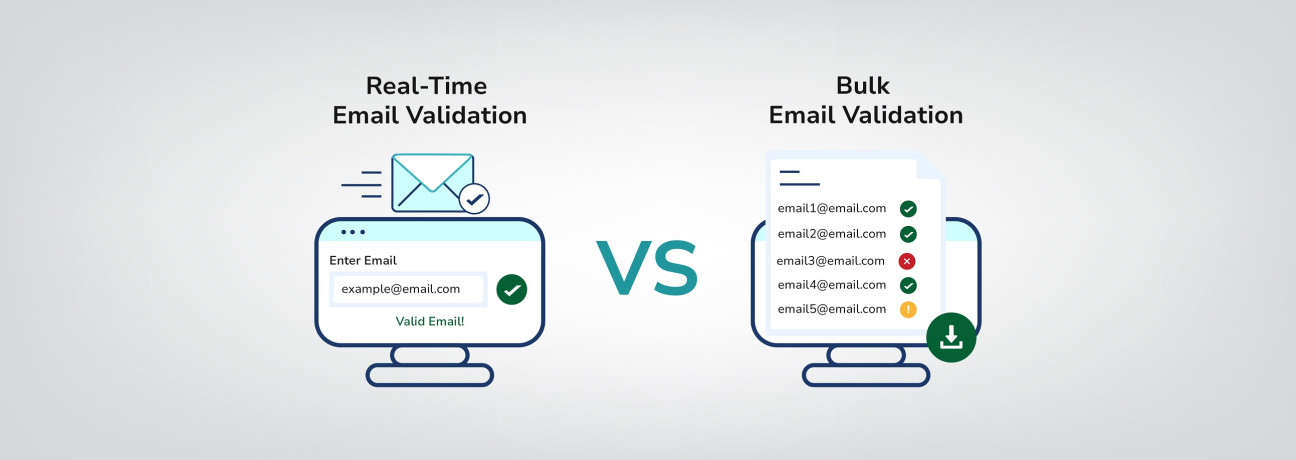
Some companies verify email addresses instantly during form submissions to stop invalid contacts from entering their systems. Others validate large email lists in bulk to identify risky or outdated addresses before sending emails. These approaches are known as real-time email validation and bulk email validation.
Understanding the difference between these two methods can help businesses build healthier email lists, reduce bounce rates, and improve long-term email marketing performance.
What is Real-Time Email Validation?
Real-time email validation is the process of verifying an email address instantly while a user enters it into a signup form, registration page, newsletter form, or lead capture field.
Instead of validating email addresses after they are collected, the verification happens during the submission process itself. This helps businesses prevent invalid, fake, disposable, mistyped, or risky email addresses from entering their databases.
The verification process happens in real time and typically includes:
- Email format and syntax validation
- Domain and MX record verification
- Mailbox and SMTP verification
- Disposable and temporary email detection
- Catch-all email detection
What is Bulk Email Validation?
Bulk email validation is the process of verifying large email lists in batches to identify invalid, inactive, disposable, catch-all, risky, spam-trap, duplicate, or outdated email addresses.
It helps businesses clean existing email databases before sending email campaigns, newsletters, sales outreach emails, or marketing communications.
Bulk email validation is commonly used for CRM databases, newsletter subscriber lists, lead generation contacts, customer databases, and cold outreach lists.
The validation process typically includes checks such as:
- Email format and syntax validation
- Domain verification
- MX record checks
- SMTP and mailbox verification
- Disposable and temporary email detection
- Spam-trap detection
- Duplicate email identification
- Invalid, inactive, and Catch-all email detection
How Real-Time Email Validation Works
Most users never see the verification process happening in the background, but real-time email validation performs several instant checks before an email address is accepted.
Within seconds, the system analyzes the email address to identify formatting issues, invalid domains, disposable emails, and other potential risks that could affect your email deliverability and database quality.
1. Syntax and Format Validation
The validation process begins by checking whether the email address follows proper formatting standards.
The system looks for issues such as:
- Missing “@” symbols
- Invalid characters or spaces
- Incorrect domain formatting
- Extra or misplaced dots
If the email structure is invalid, the address is rejected immediately before the form submission continues.
2. Domain and MX Record Verification
Next, the validator checks whether the domain is active and configured to receive emails.
This includes verifying:
- Domain existence
- MX (Mail Exchange) records
- Mail server configuration
If the domain cannot receive emails or does not exist, the email address is marked as invalid.
3. High-Risk and Role-Based Email Detection
The system scans the email address against databases of temporary and disposable email providers that are commonly used to bypass signup forms.
It may also identify:
- Role-based email addresses such as support@, sales@, or info@
- Catch-all domains that accept all incoming email messages
- Other email addresses that may present deliverability or engagement risks
While these addresses are not necessarily invalid, they may require additional consideration depending on your marketing, sales, or customer communication goals.
4. Mailbox and SMTP Verification
To further verify the email address, the validator may perform an SMTP-level check with the destination mail server.
This step helps determine whether:
- The mailbox exists
- The server can receive emails
- The address appears capable of receiving messages
If the server rejects the mailbox or returns an error response, the email address may be flagged as invalid, undeliverable, or risky.
5. Instant Validation Response
After completing all verification checks, the system instantly returns the validation result to the form or application.
Valid email addresses are accepted, while invalid or risky addresses can trigger an error message asking the user to enter a different email address before submission.
How Bulk Email Validation Works
Bulk email validation helps businesses clean existing email lists before sending marketing campaigns, newsletters, or sales outreach emails.
Instead of validating email addresses during form submissions, bulk validation processes large volumes of previously collected email addresses at once.
The system performs the same core verification checks used in real-time validation, including format validation, domain and MX record verification, risk detection, and mail server verification where available. Once processing is complete, the results are organized for review and cleanup.
1. List Cleanup and Categorization
After verification is complete, the system organizes email addresses into categories such as:
- Valid
- Invalid
- Disposable
- Catch-all
- Role-based
- Unknown or risky
Bulk validation may also identify and remove duplicate email addresses within the uploaded list, helping businesses maintain cleaner databases and avoid sending multiple emails to the same contact.
2. Exporting the Cleaned Email List
Once processing is complete, the cleaned email list can be downloaded or synchronized with CRM and email marketing platforms.
Using verified email data helps reduce bounce rates, improve deliverability, protect sender reputation, and maintain healthier email databases.
When Should You Use Real-Time Email Validation?
Real-time email validation works best anywhere users submit email addresses directly through your website, application, or signup process. Its primary role is to identify mistakes and low-quality entries before they become part of your customer database.
Common use cases include:
- User registrations and account creation
- Newsletter and promotional signups
- SaaS free trial forms
- E-commerce checkout flows
- Event registrations and lead capture pages
These interactions usually happen quickly, especially on mobile devices where typing mistakes are more common. Even small errors in the email field can lead to missed onboarding emails, failed order confirmations, or lost sales opportunities.
By checking email addresses during submission, businesses can improve contact accuracy, reduce unnecessary bounce rates, and maintain more reliable customer records from the beginning.
When Should You Use Bulk Email Validation?
Bulk email validation is most useful when businesses need to verify and clean existing email databases before sending campaigns or outreach emails.
Unlike real-time email validation, which checks email addresses during submission, bulk validation works on email lists that have already been collected and stored in CRM systems, marketing platforms, or customer databases.
Email lists naturally accumulate invalid, outdated, duplicate, disposable, catch-all, or non-deliverable email addresses. According to HubSpot, email marketing databases naturally decay by approximately 22.5% every year if they are not regularly maintained.
Bulk email validation is commonly used in situations such as:
- Preparing email lists before marketing campaigns
- Cleaning older customer or subscriber databases
- Verifying outreach or prospecting email lists
- Reviewing large CRM contact databases
- Auditing imported or third-party contact lists
As email databases grow, regular validation becomes important for maintaining accurate contact records before large-scale email activity.
Why Businesses Need Both Real-Time and Bulk Email Validation
Email data changes constantly. New contacts enter the system through signup forms, subscriptions, checkout pages, and lead generation campaigns, while older email addresses may become inactive, abandoned, or outdated over time.
Because of this, relying on only one validation method is often not enough.
Real-time email validation helps businesses check email addresses at the moment they are submitted, reducing typos, fake signups, and incorrect entries during data collection.
Bulk email validation, on the other hand, helps review and clean existing contact databases by identifying outdated, duplicate, risky, or non-deliverable email addresses already stored in CRM systems and marketing platforms.
When used together, these two approaches help businesses maintain healthier email lists, improve campaign reliability, and support better long-term email data management.
Bottom Line
Email validation has become an important part of maintaining reliable email communication, not just a method for removing incorrect email addresses from a contact list.
As businesses grow their email marketing, sales outreach, onboarding, and customer communication efforts, inaccurate or outdated email data can gradually affect bounce rates, inbox placement, campaign performance, and sender reputation.
Real-time and bulk email validation solves different parts of this challenge. Real-time validation helps improve data accuracy during signup and form submissions, while bulk validation helps businesses review and maintain the quality of existing contact databases before large-scale email activity.
Businesses that regularly monitor and maintain email data quality are generally better positioned to support stronger deliverability, cleaner databases, and more consistent email performance.