

You rarely notice an invalid email address at first. There’s no alert or warning. Everything looks normal until emails start bouncing, engagement drops, and your messages begin landing outside the inbox. By the time you realize what’s happening, your sender reputation may already be affected.
Industry benchmarks show that bounce rates above 2% signal poor list quality. Even well-maintained email lists lose 20–30% of their accuracy each year due to job changes, inactive accounts, and temporary signups. Just a few unverified addresses can quietly damage email deliverability and make it harder for your emails to reach real recipients.
So how do you know if an email address is actually valid and able to receive messages? Why do some emails succeed while others fail silently? And how can you confirm an address is real without sending a test email?
In this blog, we’ll explain how to determine whether an email address is valid using email verification tools and manual checks. You’ll learn practical ways to identify risky email addresses before sending an email.
What Is a Valid Email Address?
A valid email address is an email that is properly formatted, connected to a real domain, and able to receive messages without bouncing. In simple terms, it’s an working email that belongs to a real user.
For an email address to be considered valid, it must:
✔️
Follow the correct format (for example: name@domain.com)
✔️
Belong to an active and registered domain
✔️
Have an existing mailbox that can accept incoming emails
✔️
Not be linked to disposable or temporary email services
When an address meets these conditions, it can receive emails successfully without causing delivery failures or harming your sender reputation.
Why Email Validation Is Important
Email validation is essential for ensuring email deliverability. Sending messages to invalid, inactive, or temporary addresses leads to bounced emails, lower inbox placement rate, and reduced engagement.
Professionals in marketing, sales, recruiting, customer success, and operations rely on email to reach subscribers, leads, candidates, and users with time-sensitive updates, account information, confirmations, and alerts. Invalid addresses can lead to high bounce rates, wasted resources, and damage to your sender reputation.
By verifying email addresses before sending, teams keep email lists accurate, protect sender reputation, and improve the success rate of their campaigns. This helps ensure every message reaches the intended recipient efficiently and maximizes inbox placement rate.
How To Check if an Email Address Is Valid Without Sending an Email
Before sending emails, it’s possible to verify whether an address is valid and deliverable without contacting the recipient directly. This is done through a series of technical checks that analyze the email’s format, domain configuration, and mailbox status.
Email verification software performs these checks using advanced techniques and proprietary methods. Instead of sending a real message, they communicate with mail servers to confirm whether an address exists and can receive emails.
The process typically involves following validation steps:
●
Syntax check (format validation)
●
Domain check (domain and mail server validation)
●
Detection of disposable and role-based email types
Syntax Check: Verifying the Email Format
A syntax check confirms that an email address follows the correct formatting rules. It evaluates both the part before the @ symbol (the user identifier) and the part after @ (the domain) to make sure only allowed characters are used and the overall structure is valid.
For example, address like jane.doe@example.com is properly formatted, while jane..doe@@example..com or jane@doe@com are invalid. Syntax checks identify these formatting errors before messages are sent, helping prevent hard bounces and improve mailbox placement.
Performing a syntax check does not contact the mailbox. Instead, it analyzes the structure of the email address using standardized formatting rules. Most email verification tools automatically perform syntax checks along with domain and server-level checks, helping organizations clean their lists efficiently without sending a single message. By removing improperly formatted addresses early, only correctly structured emails move on to deeper verification.
Syntax Check: Verifying the Email Format
| Section | Do | Don’t | Example |
|---|---|---|---|
| User Identifier (before @) | Use letters, numbers, ., _, +, - | Start/end with a dot, use consecutive dots, or include spaces | ✅ john.doe ❌ john..doe |
| @ Symbol | Use a single @ to separate user and domain | Use multiple @ symbols | ✅ j john@example.com ❌ john@@example.com |
| Domain Name (after @) | Use letters, numbers, hyphens, and a valid domain | Start/end with hyphens or omit the domain ending | ✅ example.com ❌ -example.com |
| General Rules | Follow proper format with no spaces | Include spaces or unsupported characters | ✅ jane.doe+sales@example-company.com ❌ jane doe@@example..com |
As shown in the table above, dots are generally not allowed in the user name; however, they are allowed when the user name is enclosed in quotes (e.g., "John.Doe"@example.com or "John..Doe"@example.com).
Note: A Top-Level Domain (TLD) is the final part of a domain name after the last dot (such as .com or .org). While a valid TLD is necessary, email delivery also depends on whether the domain has properly configured mail servers (MX records) that can accept messages.
Common TLD examples include:
●
.com — commercial
●
.org — organization
●
.net — network
●
.edu — education
●
.gov — government
●
.Country codes like .us, .uk, and .in
Domain and MX Record Check: Confirming the Email Domain Can Receive Messages
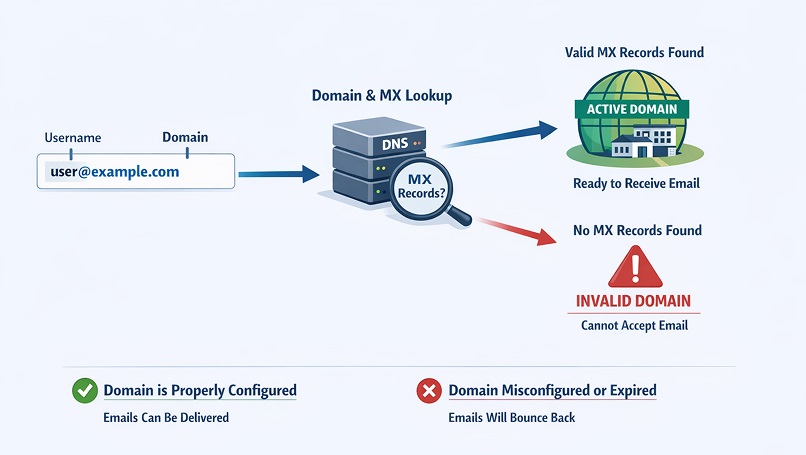
After verifying that an email address is correctly formatted, the next step is to confirm whether its domain can actually receive email. An address may look valid, but if the domain is expired or misconfigured, messages sent to it will fail.
A domain check confirms that the portion after the @ symbol is registered and active. As part of this process, email verification systems examine MX (Mail Exchange) records, which identify the servers responsible for accepting incoming messages.
MX records act like routing instructions that direct email to the correct destination servers. If a domain is missing valid MX records, it cannot reliably receive mail even if it appears legitimate. Detecting these issues early prevents delivery failures and unnecessary bounce rates. (For a deeper explanation of MX records, see our detailed guide on MX record checks.)
This step performs a technical lookup of publicly available DNS records to confirm that the domain is properly configured to receive mail. In practice, domain and MX validation are automatically handled by email verification tools as part of a broader checking process. By filtering out addresses associated with inactive or misconfigured domains, email marketers maintain cleaner lists and reduce avoidable delivery problems.
Disposable, Role-Based, and Catch-All Email Detection
Even when an email address passes syntax, domain, and mailbox checks, it may still affect list quality and long-term engagement. This is why advanced email verification evaluates whether an email address belongs to a disposable, role-based, or catch-all category.
Disposable email addresses are temporary accounts created through short-term email services. People often use them to access content without using real email addresses. While these addresses may initially accept messages, they are rarely monitored and typically expire quickly, making them unreliable for ongoing engagement.
Role-based addresses are shared inboxes such as info@, support@, or admin@ that are managed by teams rather than individuals. Although they are legitimate, emails sent to these addresses may not reach a specific mailbox and often result in lower engagement.
Catch-all domains are configured to accept emails sent to any address at the recipient domain, even if a specific mailbox does not exist. Because the server accepts all incoming messages, it becomes difficult to verify whether a valid recipient mailbox exists. Email verification tools identify these patterns and classify them as risky so organizations can decide how to handle them. To learn more, see our detailed guide on catch-all email addresses.
By detecting these categories early, businesses gain a clearer understanding of email list quality. Instead of assuming every technically valid email represents an engaged recipient, one can segment or filter risky addresses to protect deliverability and improve campaign performance.
How To Check if an Email Is Valid Manually
Manual email validation can help identify common errors when reviewing a small list of email addresses. However, it only provides surface-level screening and cannot confirm whether a mailbox actually exists. These checks help spot clear errors before sending emails.
Check the Email Format
Start by reviewing the structure of the email address. A valid email should follow the standard format rules explained earlier in this guide. During a quick inspection, look for obvious typing mistakes such as missing symbols, extra spaces, or misspelled domains.
This simple review cannot confirm whether a mailbox exists, but it helps filter out obvious formatting mistakes before deeper verification.
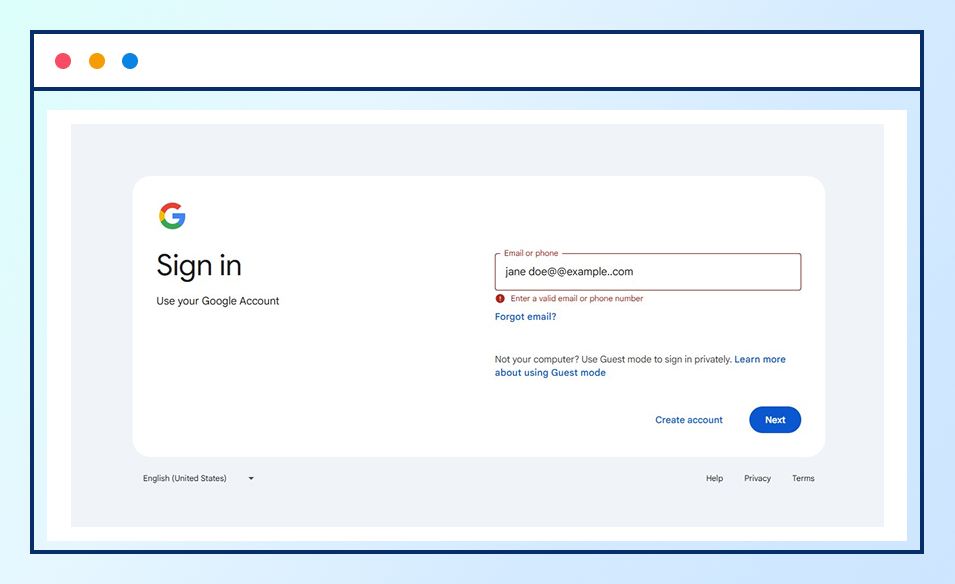
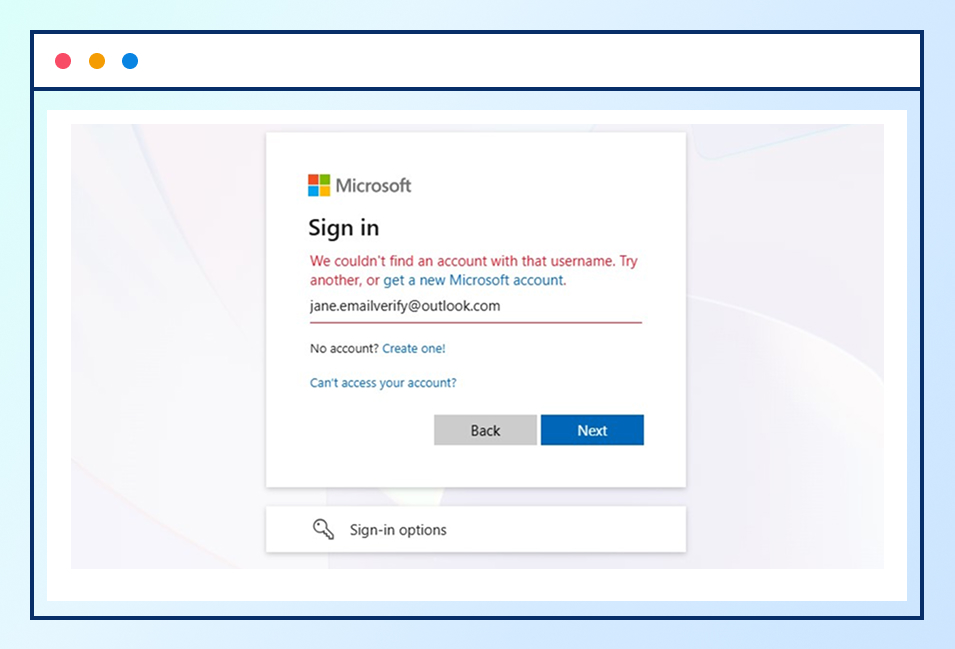
Even if an email address looks perfectly formatted, like jane.emailverify@outlook.com, it doesn’t guarantee the mailbox actually exists. To manually verify it, visit the login page for the same email provider(Google, Yahoo, Outlook). For example, check Gmail addresses on Gmail’s login page and Outlook addresses on Microsoft Outlook’s login page. If the login page indicates the account doesn’t exist, you’ll know the email is invalid before sending any messages.
Verify the Domain’s Legitimacy
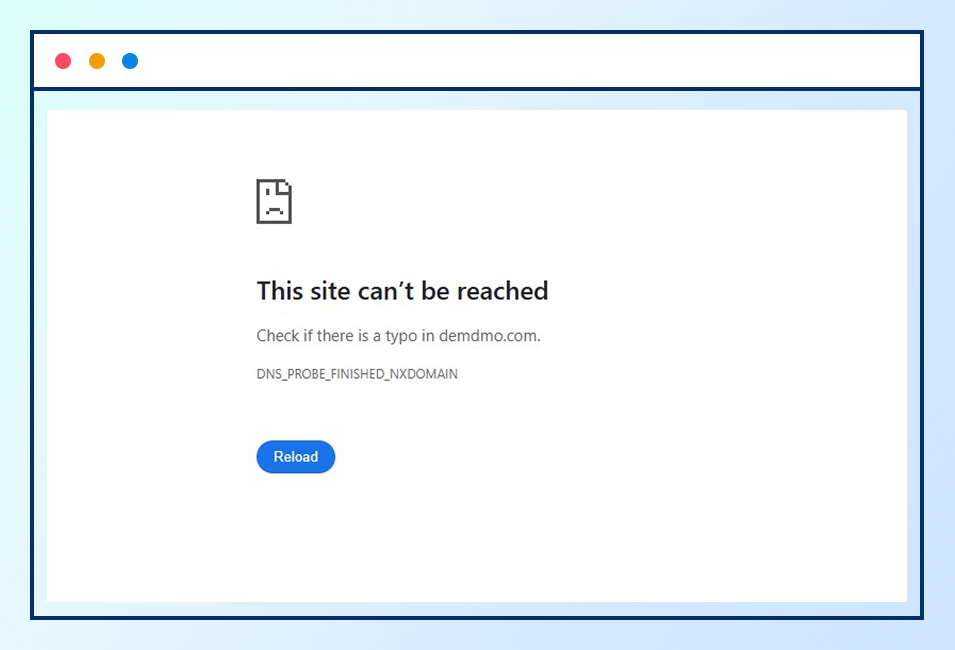
Inspect the domain portion of the email (the text after @) to see whether it belongs to an active and legitimate domain. For example, in the email user@examplecompany.com, examplecompany.com is the domain name. Entering this domain into a browser can help confirm whether it is active and correctly spelled. If the domain name contains a typo, such as examplecompanny.com instead of examplecompany.com, typing it into a browser will usually display a “This site can’t be reached” error, indicating that the domain is likely invalid.
Search for Public Association
Searching for an email address in search engines or professional platforms may reveal whether it is publicly associated with an individual or organization. This can provide indirect evidence of active use, particularly in targeted B2B research.
Send a Test Email Carefully
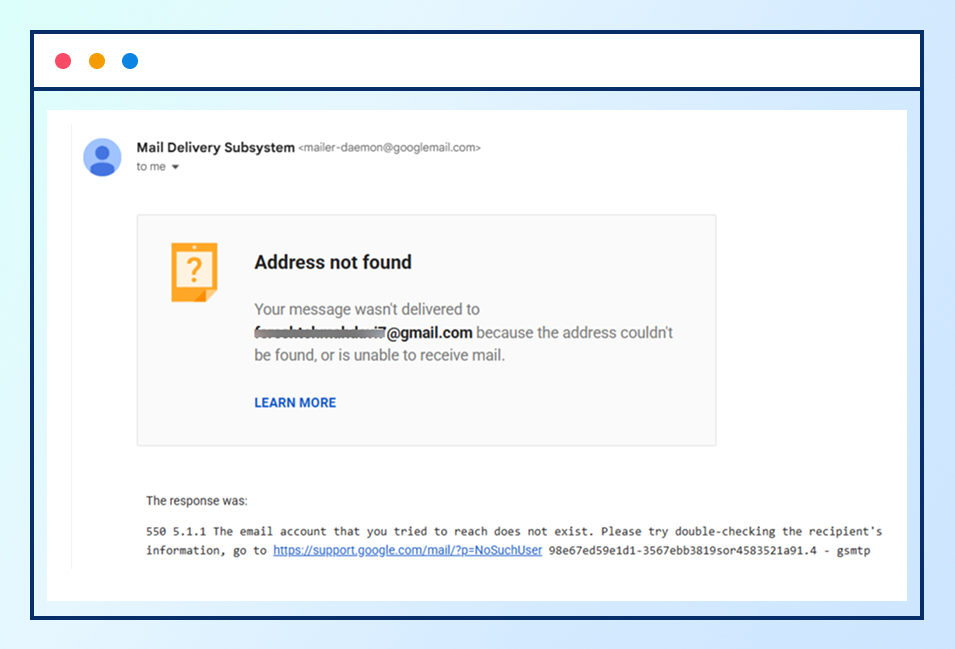
A single test email can sometimes reveal whether an address generates a hard bounce, which usually indicates a non-existent mailbox. However, repeated bounced messages can harm the sender reputation. This method should be used sparingly and never for validating large groups of addresses. For a detailed explanation, check our guide on email bounce types.
Consider the Data Source
The reliability of an address often depends on how it was obtained. Emails collected from scraped or third-party sources frequently contain outdated or inaccurate information. Manual review can catch obvious issues, but externally sourced lists typically require automated verification.
Limitations of Manual Email Validation
While manual checks can help with quick screening and may confirm whether a mailbox exists, they cannot perform the deeper technical validation needed for email deliverability, such as analyzing server response and domain status. Even though manual checks may work for a small number of emails, an email validation tool provides more reliable insights into deliverability. For smaller volumes, you can also try an online free email checker.
Why Some Email Addresses Cannot Be Fully Verified
Not every email address can be verified with absolute certainty, even when advanced verification methods are used. Modern email verification tools perform deep checks, such as syntax validation, domain analysis, and SMTP verification. However, some email systems are intentionally designed to limit the information they reveal. As a result, certain addresses may return inconclusive or “unknown” results. These protections are designed to reduce spam and automated probing, but they also make it harder for verification tools to receive a definitive response.
Another factor is the presence of catch-all email domains. In a catch-all setup, the mail server accepts messages sent to any address under the domain, even if the specific mailbox does not actually exist. Because the server appears to accept every address, email verification tools cannot reliably determine whether a message will reach a real person or simply be absorbed by the system.
Temporary server issues can also affect email verification results. If a mail server is experiencing downtime, rate limits, or connection restrictions at the time of the check, the verification process may not receive a clear response. In these cases, the address may be marked as unknown, which can be verified again, though it may still be valid.
Understanding these limitations is important because email verification is about risk reduction, not absolute guarantees. Even the most advanced tools aim to minimize bounce rates and improve list quality, but some uncertainty is unavoidable due to how email infrastructure is designed. Recognizing why certain addresses cannot be fully verified helps organizations make smarter decisions about how to handle uncertain or risky emails.
Bottom Line
Knowing whether an email address is valid requires a structured verification process that checks format accuracy, domain configuration, mailbox availability, and risk factors such as disposable or catch-all addresses.
While some basic issues can be spotted manually, reliable validation depends on automated systems that perform these checks without sending real messages. This approach allows organizations to detect invalid or risky addresses before they affect deliverability.
By understanding how email verification works, you can take a proactive approach to list quality and email performance. Instead of reacting to bounced emails after they occur, you can identify problems in advance and ensure that messages consistently reach real, deliverable inboxes.