

Email security and deliverability are no longer separate concerns. Today, mailbox providers evaluate a sender's legitimacy before deciding whether to deliver an email to the inbox.
This shift has made email authentication a critical part of successful email communication. Without proper email authentication, organizations may struggle to reach customer inboxes, damage their sender reputation, and make their domains more vulnerable to spoofing and phishing attacks.
One of the key protocols behind this authentication process is Sender Policy Framework (SPF). By verifying which servers are authorized to send email from a domain, SPF helps prevent email spoofing and supports email deliverability.
For organizations that rely on email communication, understanding SPF is essential for protecting domain reputation, reducing spoofing risks, and supporting reliable email delivery.
What Is Sender Policy Framework (SPF)?
Sender Policy Framework (SPF) is an email authentication protocol that allows domain owners to specify which mail servers are authorized to send emails on behalf of their domain. This information is published through an SPF record in the domain's DNS settings, enabling receiving mail servers to verify whether incoming emails originate from approved sources.
By validating authorized senders, SPF helps reduce the risk of domain spoofing and supports the broader goal of establishing trust in email communications. SPF is widely used alongside DKIM and DMARC as part of a comprehensive email authentication strategy.
How SPF Authentication Works
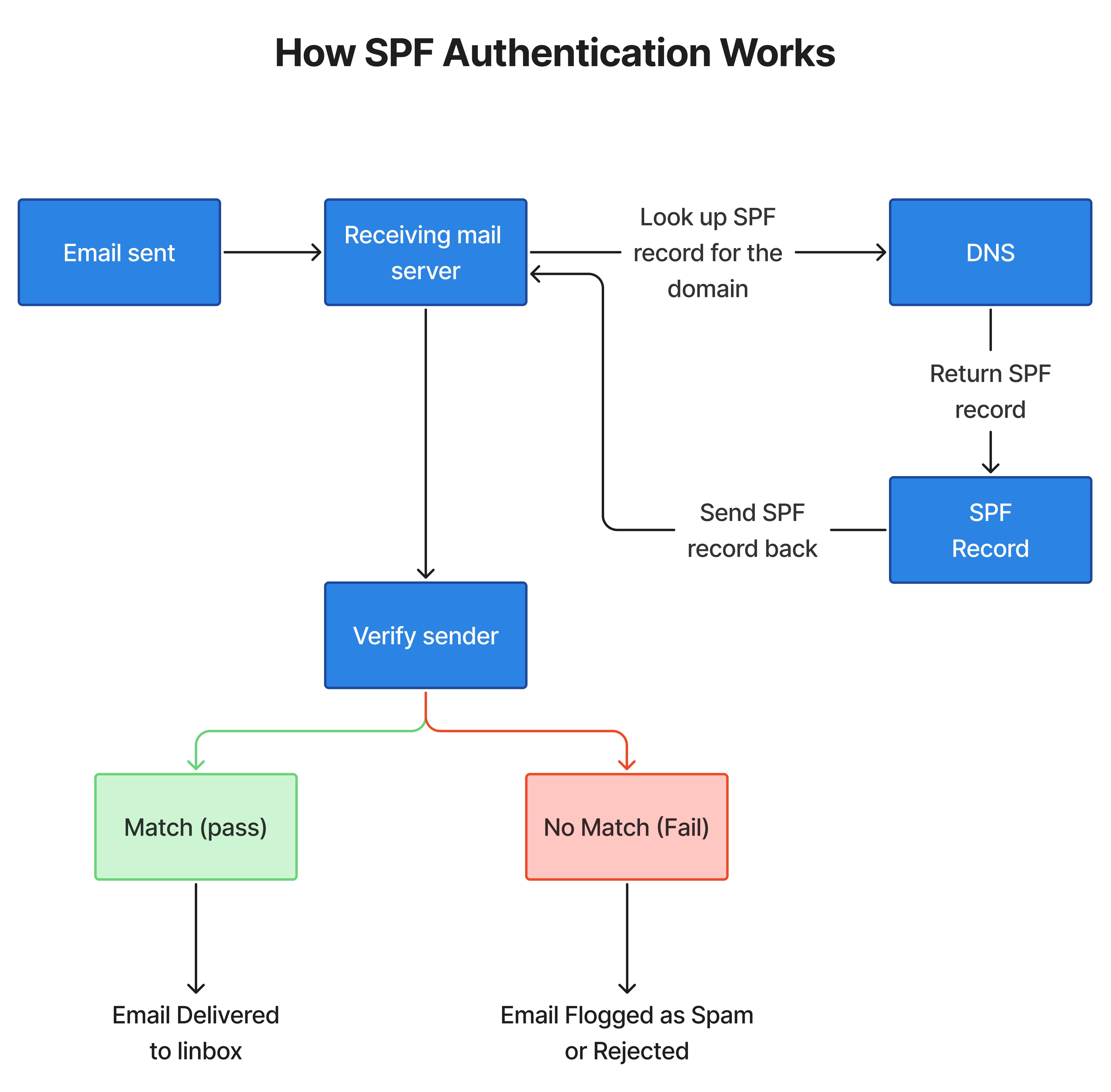
When an email is received, the receiving mail server performs a series of checks to verify that the message originated from an authorized sender. The SPF authentication process can be understood by following these steps.
Step 1: The SPF Check Begins
When an email is sent, the receiving mail server runs an SPF check to verify whether the sending server is authorized to send email from the sender's domain. It does this by looking up the domain's SPF record in DNS.
Step 2: The SPF Record Is Retrieved
The receiving mail server looks up the sender’s domain in the Domain Name System (DNS) to retrieve its SPF record. This record contains a list of approved mail servers and IP addresses that are authorized to send emails on behalf of the domain.
Step 3: The Sender Is Verified Against the SPF Policy
If the sending server matches the domain's SPF policy, the email passes the SPF check. If it does not match, the email may fail authentication, be flagged as suspicious, routed to spam, or rejected, depending on the receiving server's policies.
Step 4: The Email Is Processed Based on the SPF Result
The receiving server uses the SPF result to decide how to handle the message, helping mailbox providers identify unauthorized senders and reduce the risk of spoofed emails reaching recipients.
Why SPF is Important for Email Security
Email security has become a critical priority for businesses as phishing attacks, domain spoofing, and email fraud continue to increase. Attackers frequently attempt to impersonate legitimate organizations by sending emails that appear to come from trusted domains, making it difficult for recipients and mailbox providers to distinguish genuine messages from fraudulent ones. According to Proofpoint's report, 71% of organizations experienced at least one phishing attack, highlighting the continued effectiveness of email-based threats. Many of these attacks rely on sender impersonation and domain spoofing to gain credibility and deceive recipients.
To address this challenge, modern email systems rely on authentication protocols that verify the legitimacy of email senders. SPF is one of the core authentication standards used for this purpose. It allows domain owners to specify which mail servers are authorized to send emails on behalf of their domain, helping receiving servers identify unauthorized senders and reduce the risk of domain impersonation.
How SPF Influences Email Deliverability
Mailbox providers evaluate multiple factors to determine whether email is delivered, filtered, or rejected. SPF is one of the email authentication methods that helps verify that a message originates from a server approved by the sending domain.
A valid SPF record enables receiving servers to perform this verification quickly and accurately. When SPF passes, it contributes to the overall authentication assessment of the message. When SPF fails due to missing, incorrect, or outdated records, receiving servers may treat the email with greater caution, which can affect delivery outcomes.
Although SPF is not the only factor that influences inbox placement, it plays an important role in helping mailbox providers evaluate sending sources and process email more confidently.
Common SPF Failures That Can Affect Inbox Placement
Configuration errors, outdated records, and changes to email infrastructure can lead to SPF authentication failures. As organizations use multiple email platforms and third-party sending services, maintaining an accurate SPF record becomes increasingly important. Even minor misconfigurations can affect authentication results and create email delivery challenges. Some of the most common SPF-related issues include:
Missing SPF Records
Domains without an SPF record do not provide a defined list of authorized sending sources, making sender authentication more difficult.
Incorrect SPF Syntax
Formatting errors, invalid mechanisms, or improperly structured records can prevent SPF checks from being evaluated correctly. Using an SPF record generator can help create properly formatted records and reduce the risk of configuration errors.
Exceeding the DNS Lookup Limit
SPF evaluations are limited to 10 DNS lookups. Organizations that use multiple email service providers or complex SPF configurations may exceed this limit, causing SPF validation to fail.
Unauthorized Sending Sources
When new email platforms or third-party services are added without updating the SPF record, emails sent through those services may fail authentication.
Outdated SPF Records
Changes to email infrastructure often require SPF updates. Records that are not regularly maintained may no longer accurately reflect authorized sending sources.
Bottom Line
SPF helps receiving mail servers verify whether emails are sent from authorized sources. As a core component of email authentication, it helps reduce spoofing risks and provides a foundation for evaluating sender legitimacy. However, SPF is most effective when implemented alongside DKIM and DMARC.
Regularly reviewing SPF records, updating them as email infrastructure evolves, and addressing configuration issues can help maintain accurate authentication and support consistent email delivery.
Frequently Asked Questions (FAQs) on SPF Records
1. I set up my SPF record, but my marketing emails are still heading straight to the spam folder. What am I missing?
SPF helps receiving mail servers verify whether a sender is authorized to send emails on behalf of a domain, but it does not guarantee inbox placement. Spam filtering also considers factors such as sender reputation, DKIM and DMARC configuration, email content, engagement rates, and email list quality. If emails continue going to spam, reviewing the overall authentication setup and sending practices is recommended.
2. We use two different platforms for marketing and transaction emails. Can I just create two separate SPF records?
No. A domain should have only one SPF record. If you use multiple email platforms, their authorized sending sources should be included within a single SPF record. Publishing multiple SPF records can cause SPF checks to fail and may lead to authentication issues.
3. How do I securely let an outside agency or vendor send emails on our behalf without messing up our own SPF record?
If a vendor needs to send emails using your domain, their sending service must be properly authorized through your email authentication setup. To keep third-party sending separate from your primary domain, many organizations use a dedicated subdomain for vendor-managed email campaigns. This helps isolate vendor activity while maintaining control over your main domain's email authentication.
4. How does SPF work when I use third-party email providers (like Mailchimp, HubSpot, or ActiveCampaign)
When using third-party email providers, their sending servers must be authorized within your SPF record. In the ExactVerify SPF Generator, you can enter the third-party email service in the designated field, and the tool will generate an SPF record that includes the required authorization. This helps receiving mail servers verify that the provider is permitted to send emails on behalf of your domain.
5. If I have SPF, do I still need DKIM and DMARC?
Yes. SPF is only one part of email authentication. DKIM helps verify that email content has not been altered in transit, while DMARC builds on SPF and DKIM to define how authentication failures should be handled. Together, SPF, DKIM, and DMARC provide stronger protection against spoofing and help support email deliverability.
6. We migrated from Google Workspace to Microsoft 365. Do I really need to clean up the old Google tag in our SPF?
If Google Workspace is no longer used to send emails for your domain, it is generally a best practice to remove outdated SPF entries. Keeping unnecessary sending sources authorized can make SPF records harder to manage and may contribute to SPF lookup limit issues. Regular SPF reviews help ensure that only active email services remain authorized.