

Every time you unlock your phone using a fingerprint or face recognition, the system verifies your identity before granting access. This process ensures that only authorized users can access sensitive information.
A similar concept applies to email.
When an email is sent from your domain, mailbox providers need a way to verify that the message is genuinely coming from you and not from someone attempting to impersonate your brand. Without this verification, emails can be flagged as suspicious, filtered to spam, or even blocked.
This is where email authentication methods come into play. They help establish trust between the sender and receiving servers, ensuring that your emails are recognized as legitimate and safely delivered to the inbox.
In this blog, we will cover what email authentication is, whether it is mandatory, the different authentication methods, and the common mistakes to avoid, and how they affect email deliverability and your domain reputation.
What Is Email Authentication?
When an email is sent, it passes through multiple servers before reaching the recipient inbox, where mailbox providers evaluate whether the message can be trusted. To make this decision, they rely on email authentication.
Email authentication helps mailbox providers verify that the sender is authorized and that the message is legitimate. This verification plays a key role in determining whether an email is delivered to the inbox, filtered to spam, or rejected.
This process is carried out using authentication methods such as SPF, DKIM, and DMARC, which work together to validate the sender and ensure the integrity of the message.
Why Is Email Authentication Important?
Email authentication is essential for anyone sending emails from their domain, including:
- Businesses running email marketing campaigns or newsletters
- Teams sending transactional emails such as order confirmations or notifications
- Sales teams using cold email outreach
- Any organization using an email service provider (ESP)
In recent years, authentication has shifted from a recommended practice to a standard requirement. Major mailbox providers, including Google and Yahoo, began enforcing stricter sender requirements in February 2024, making it necessary for senders, especially those sending high volumes of emails, to authenticate their emails using methods such as SPF, DKIM, and DMARC, as outlined in their official guidelines.
Without proper authentication, mailbox providers cannot confidently verify your emails, increasing the risk of being flagged, filtered to spam, or rejected, which directly affects deliverability and domain reputation.
Types of Email Authentication Methods
To better understand email authentication, it’s important to look at each method and the role it plays in verifying and securing your emails.
SPF (Sender Policy Framework)
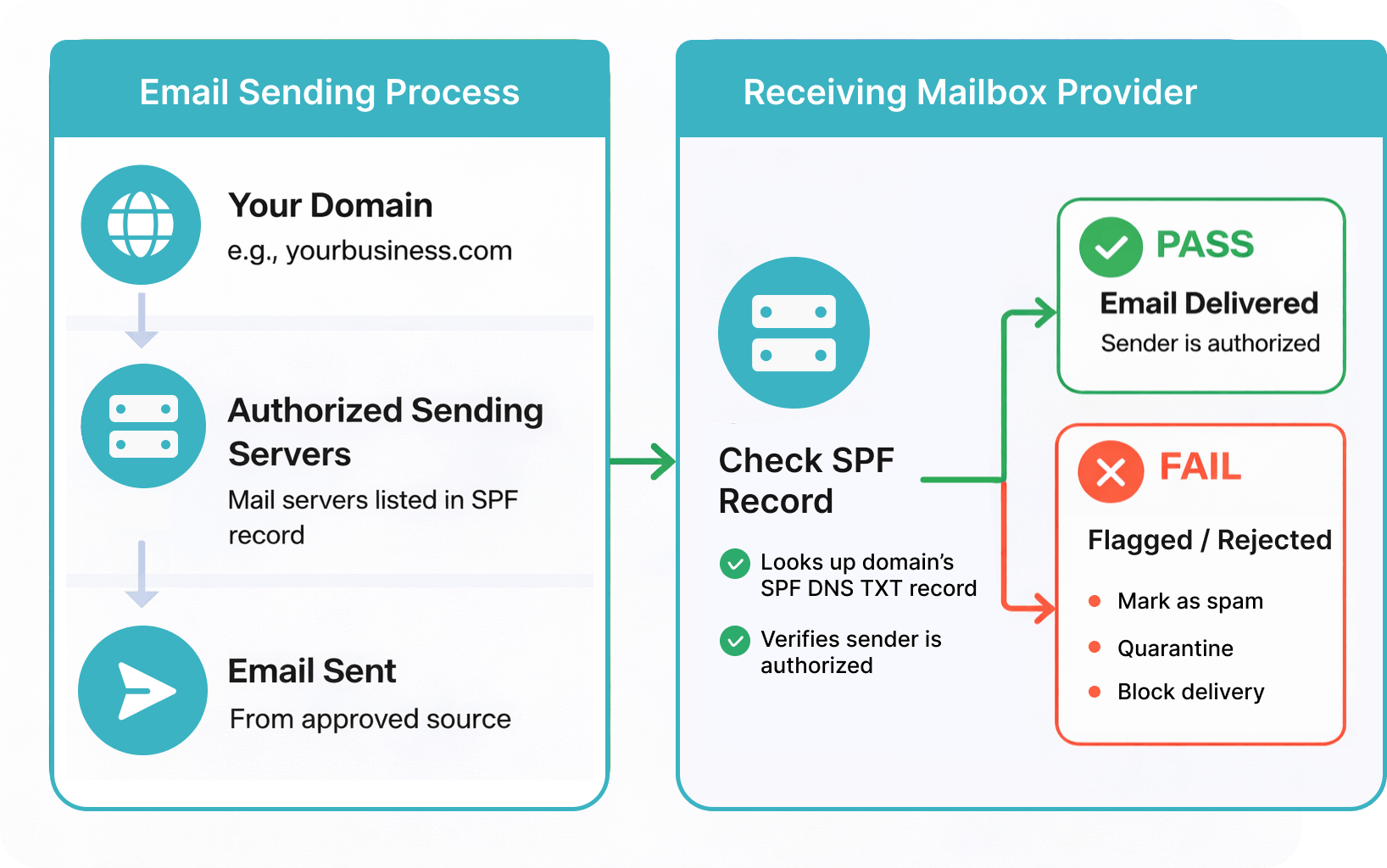
The Sender Policy Framework (SPF) is an email authentication protocol that allows domain owners to specify which servers are authorized to send emails on behalf of their domain.
It works through a DNS TXT record that lists approved sending sources or servers. When an email is received, the mailbox provider checks whether the email is coming from one of these approved sources to confirm that it is allowed to send emails for the domain. If there is no match, the email may fail authentication and be flagged or rejected.
SPF plays an important role in preventing unauthorized senders from using your domain, helping reduce the risk of spoofing and spam. Without a properly configured SPF record, mailbox providers may treat your emails as suspicious.
In many cases, email service providers (ESPs) help with SPF setup by automatically generating the SPF record you need and guiding you on where to add it in your domain’s DNS settings. When you connect your domain to an ESP, it provides a value (usually a TXT record) that includes its sending servers. Once you add this record to your DNS settings, mailbox providers can recognize the ESP as an authorized sender for your domain.
However, SPF only verifies where the email is sent from and does not check the content of the message. It can also fail when emails are forwarded, because the email may pass through a different server that is not included in the original SPF record. Even though the email is legitimate, the receiving server may not recognize it as authorized, which can affect deliverability.
DKIM (DomainKeys Identified Mail)
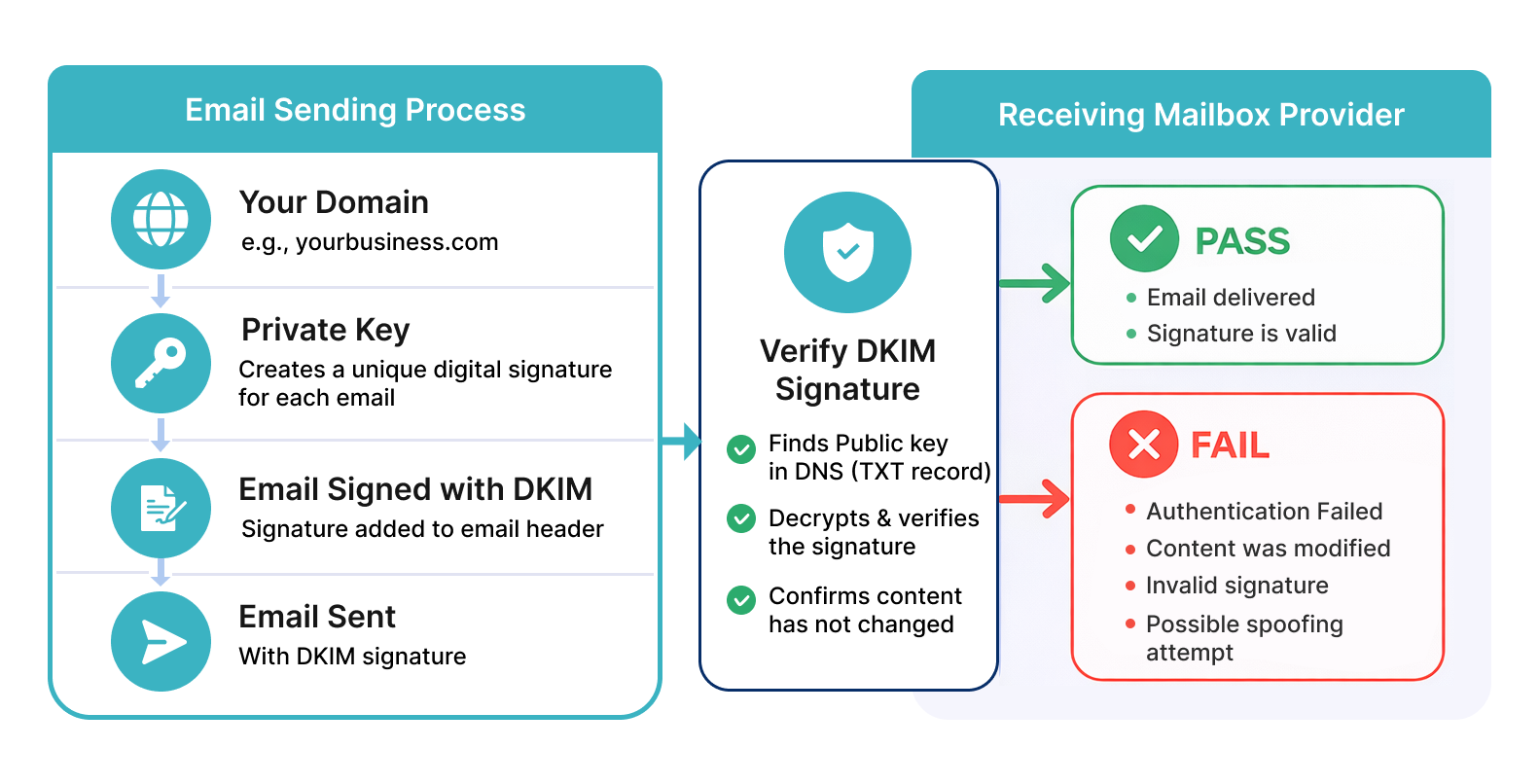
DomainKeys Identified Mail (DKIM) is another method of email authentication that ensures the email content has not been altered during transmission.
It works by adding a digital signature to each outgoing email. This signature is generated using a private key and is linked to the sending domain. When the email is received, the mailbox provider retrieves the corresponding public key from the domain’s DNS records to verify the signature. If the content of the message has been modified after it was sent, the verification fails.
DKIM helps establish trust by confirming that the email content remains unchanged and genuinely originates from the stated domain. Consistent use of DKIM also helps build a positive sender reputation over time, improving inbox placement.
However, DKIM only verifies the message and does not define what action should be taken if authentication fails. It also does not prevent unauthorized senders from attempting to use your domain.
DMARC (Domain-based Message Authentication, Reporting & Conformance)
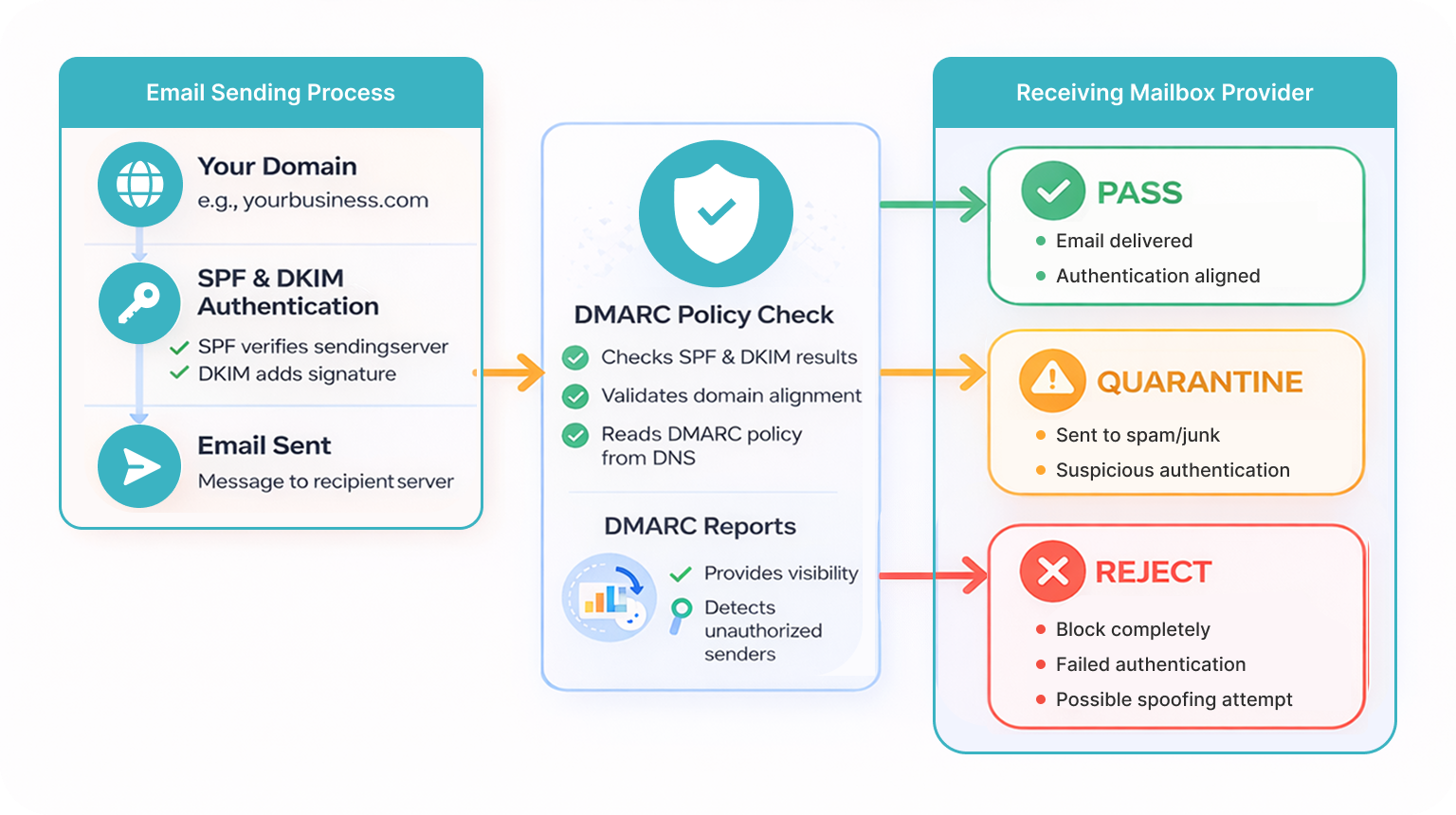
Domain-based Message Authentication, Reporting & Conformance (DMARC) is another method of email authentication that works with SPF and DKIM to tell mailbox providers how to handle emails that fail authentication and provide visibility into those results.
It works by allowing domain owners to publish a policy in their DNS records that tells mailbox providers how to handle emails that fail these authentication checks. These policies can range from monitoring to quarantining or rejecting unauthenticated emails.
DMARC also requires that the domain shown in the “From” address matches the domain used in authentication checks, ensuring the email truly comes from the claimed sender.
In addition to enforcement, DMARC provides detailed reports that give visibility into authentication results and help identify unauthorized use of a domain. This makes it a key tool for detecting spoofing attempts and protecting brand identity.
While DMARC improves email security and control, it depends on properly configured SPF and DKIM to work effectively and requires regular monitoring to ensure policies are applied correctly.
BIMI (Brand Indicators for Message Identification)
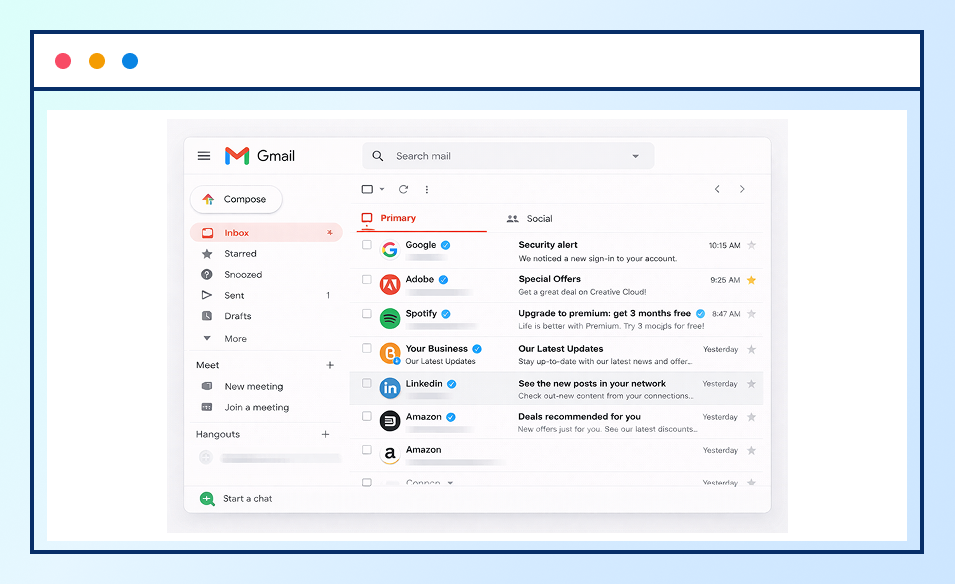
Brand Indicators for Message Identification (BIMI) is an additional layer in email authentication that allows organizations to display their brand logo next to authenticated emails in supported inboxes.
BIMI works by linking a verified logo to your domain through a DNS record. When an email is received, mailbox providers check whether the domain has a properly configured DMARC policy along with a valid BIMI record. If these requirements are met, the brand logo is displayed next to the email in the inbox.
By adding a visual layer of trust, BIMI helps improve brand recognition and reinforces the legitimacy of emails. This can increase user confidence and encourage higher engagement.
However, BIMI is not a core authentication method and does not work on its own. It depends on strong DMARC enforcement and, in some cases, may require additional verification such as a Verified Mark Certificate (VMC) for logo display in certain mailbox providers.
Comparison of Email Authentication Methods
|
Method
|
Purpose
|
What It Verifies
|
Key Benefit
|
|---|---|---|---|
| SPF | Verifies sender | Sending server (IP address) | Prevents unauthorized servers from sending emails |
| DKIM | Ensures message integrity | Email content and domain | Confirms email has not been altered in transit |
| DMARC | Policy enforcement & reporting | SPF & DKIM results (alignment) | Controls how failed emails are handled and provides visibility |
| BIMI | Brand visibility | Authenticated domain (via DMARC) | Displays brand logo in the inbox |
Common Mistakes to Avoid in Email Authentication
While implementing email authentication is essential, certain misconfigurations can reduce its effectiveness and impact email deliverability.
1. Keeping DMARC in monitoring mode for too long
Simply setting up DMARC is not enough. If it is not configured to block or filter suspicious emails, your domain can still be misused for spoofing.
2. Not applying authentication to subdomains
Authentication should not be limited to the main domain. Subdomains (such as marketing.yourdomain.com or support.yourdomain.com) must also be properly configured to prevent unauthorized use and reduce security risks.
3. Incorrect or multiple SPF records
A domain should have only one SPF record in its DNS settings. Having multiple or conflicting SPF records can confuse mailbox providers and lead to authentication failures, even for legitimate emails. It is important to combine all authorized sending sources into a single, properly formatted SPF record.
4. Overly restrictive SPF or DKIM settings
If SPF or DKIM is configured too strictly, it may block legitimate emails sent through third-party services such as email marketing platforms or CRM tools. This usually happens when those services are not properly included in your authentication setup, causing valid emails to fail verification.
5. DKIM configuration errors
Even small mistakes in DKIM setup, such as incorrect or incomplete DNS records, can cause signature verification to fail. When this happens, mailbox providers may not trust the email, which can affect deliverability and reduce the chances of reaching the inbox.
6. Not monitoring DMARC reports
DMARC reports provide useful insights into how your emails are being authenticated and whether there are any issues or suspicious sending activity. Ignoring these reports makes it harder to identify configuration problems or detect unauthorized use of your domain.
7. Not securing domains that do not send emails
Even if a domain is not used to send emails, it should still be protected. Without proper configuration, such domains can be used by attackers to send fraudulent emails. Setting stricter authentication rules helps prevent this and protects your overall domain reputation.
8. Ignoring DNS update delays
Changes made to DNS records do not take effect instantly. It can take some time for these updates to be reflected across all systems. Not accounting for this delay may lead to temporary authentication failures and confusion during setup or testing.
Bottom Line
Email authentication is now must for anyone sending emails from their domain. As mailbox providers continue to enforce stricter policies, properly configured authentication has become essential for maintaining deliverability and protecting your brand.
SPF, DKIM, and DMARC each play a distinct role in verifying the sender, ensuring message integrity, and defining how authentication failures are handled. When implemented together, they help build trust with mailbox providers and improve the chances of your emails reaching the inbox.
At the same time, even small configuration errors can impact performance. Regular monitoring, proper alignment, and staying updated with authentication requirements are key to maintaining a reliable email setup.
Ultimately, strong email authentication not only protects your domain from misuse but also supports better engagement, improved deliverability, and a more trustworthy email experience for your recipients.
Frequently Asked Questions (FAQs) on Email Authentication
1. Why is email authentication important for deliverability?
Email authentication helps verify that your emails are genuinely sent from your domain. This builds trust with mailbox providers and prevents spoofing or phishing attempts. When protocols like SPF, DKIM, and DMARC are properly configured, they reduce spam risk and improve the chances of your emails reaching the inbox instead of the spam folder.
2. Which email authentication method should I set up first?
Start with SPF (Sender Policy Framework), as it’s the easiest to implement and acts as the foundation of email authentication by verifying which servers can send emails from your domain. With SPF in place, move next to DKIM, then DMARC for stronger authentication and better control.
3. How long does it take for SPF, DKIM, and DMARC to work?
SPF, DKIM, and DMARC records can start working within a few hours, but full DNS propagation usually takes 24–48 hours. It’s recommended to wait up to 48 hours after setting up SPF and DKIM before enabling DMARC to ensure everything is properly configured and stable.
4. Do I need technical knowledge to implement email authentication?
Yes, some basic technical knowledge is required because you need to update your domain’s DNS records. However, it’s not highly complex. If you can follow step-by-step instructions or use tools provided by your email platform, you can set up SPF, DKIM, and DMARC without deep technical expertise.
If you’re unsure how to set up DKIM, you can use our DKIM generator to quickly create the DKIM record for your domain.
5. Why is my email failing SPF or DKIM authentication?
Email authentication usually fails due to incorrect or incomplete DNS configuration. SPF can fail if sending IP addresses are not authorized or if DNS lookup limits are exceeded. DKIM may fail if the message is altered during transit or if the keys are misconfigured. Other common causes include misconfigured third-party sending services and outdated or incorrect SPF records.
6. Why are my emails still going to spam after setting up SPF, DKIM, and DMARC?
Even with SPF, DKIM, and DMARC, emails can still end up in spam due to factors such as poor sender reputation, low engagement, spam-like content, or alignment issues. Authentication proves your identity, but it doesn’t guarantee inbox placement. Mailbox providers also evaluate how recipients interact with your emails and the quality of your content.
7. Do I need DMARC to enable BIMI?
Yes, you need a valid DMARC record to use BIMI. Your DMARC policy should be set to enforcement, either p=quarantine or p=reject. A p=none policy will not work because BIMI needs strict authentication to show your logo.
8. Do SPF, DKIM, and DMARC improve email deliverability?
Yes, SPF, DKIM, and DMARC help improve email deliverability by verifying your sender identity and preventing domain spoofing. This builds trust with mailbox providers, reducing the chances of your emails being marked as spam. When properly configured, they support better inbox placement and help protect your domain’s reputation.