
According to Omnisend’s 2026 data , email marketing generates between $36 and $42 in revenue for every $1 spent. For e-commerce businesses , email marketing helps reach customers, promote products, and drive repeat purchases.
As your e-commerce business grows, your email marketing costs increase. Costs come from three main areas: contact list size, sending volume, and the features included in your plan.
This guide covers the main costs of e-commerce email marketing, where unnecessary spending happens, and practical ways to reduce those costs.
Understanding Your Email Marketing Costs
Email marketing costs depend on how many contacts you have, how many emails you send, and the features included in your plan.
Email platforms use different pricing models. Some charge based on active subscribers, while others charge for stored contacts or active profiles. As a result, the same number of contacts can result in different costs depending on the platform and its pricing model.
The table below shows how pricing differs across several email marketing platforms :
|
Platform
|
Pricing Model |
2,500 Contacts |
10,000 Contacts |
25,000 Contacts |
|---|---|---|---|---|
| MailerLite | Active subscribers | $49/mo | $129/mo | $239/mo |
| Mailchimp | Stored contacts | $60/mo | $126/mo | $202/mo |
| Klaviyo | Active profiles | $60/mo | $150/mo | $400/mo |
| ActiveCampaign | Stored contacts | $39/mo | $149/mo | $391/mo |
Note: Prices are illustrative benchmarks based on publicly listed plans. Actual pricing varies by platform, billing frequency, plan level, and included features. The platforms also use different definitions for billable contacts, so the figures are not directly comparable. Pricing checked in September 2026.
Contact-Based Pricing
Some email platforms base their pricing on the number of contacts included in a plan. However, the contacts included in the pricing calculation vary by platform. For example, MailerLite bases its pricing on active subscribers, while Mailchimp bases its pricing on stored contacts.
As the number of contacts in your database increases, you may move into a higher pricing tier even when your monthly email volume remains unchanged. For example, a database that grows from 10,000 to 25,000 contacts may require a higher-priced plan. On platforms that count stored contacts, contacts that remain in the database but are no longer used for marketing can also contribute to the total used for pricing.
Send-Based Pricing
Here, pricing is based on the number of emails sent during a billing period. The total cost therefore depends on your email sending volume, which is influenced by both the number of recipients and how frequently you send campaigns.
For example, one campaign sent to 8,000 contacts results in approximately 8,000 email sends. Four campaigns sent to the same 8,000 contacts result in approximately 32,000 sends. Automated emails, including welcome and abandoned-cart emails, also contribute to the total sending volume.
Plan Features
Pricing can also vary based on the features and usage limits included in each plan. Basic plans generally provide core email marketing functions, while higher-tier plans can include features such as advanced automation, segmentation, A/B testing, and reporting.
The plan you choose therefore depends not only on the size of your contact database or email volume, but also on the features and usage limits required for your email marketing activities.
Paying for Contacts You Don't Use
If your email platform includes inactive or unused contacts in its billing calculation, you may be paying for contacts you are not actively marketing to.
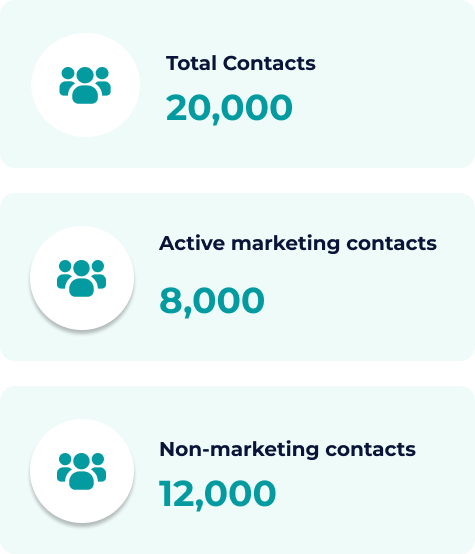
An e-commerce business may have 20,000 contacts in its database but actively market to only 8,000 of them. The remaining 12,000 contacts may include inactive subscribers, older customer records, duplicate entries, or contacts the business does not plan to use for marketing.
Your Contact Breakdown
A closer look at your database shows how many contacts you are actively marketing to and how many are outside your current audience.
Review Unused Contacts
Start by identifying contacts that are inactive, duplicated, invalid, outdated, or no longer used for marketing.
Review inactive contacts based on engagement and customer history before deciding whether they still have value. Identify and remove duplicate and invalid email addresses in your contact database.
A practical review includes:
- Identify contacts you are storing but not actively marketing to.
- Review inactive contacts to determine whether they still have value for your business.
- Remove duplicate or invalid records that are no longer required.
- Move non-marketing contacts outside the billable audience, where your platform supports this option.
Other Email Marketing Costs to Consider
The cost of email marketing includes more than the email platform subscription. Businesses may also incur costs for additional tools, integrations, content production, external services, and internal resources required to run their email marketing activities.
Third-Party Tools and Add-ons
An email marketing platform provides the core tools needed to create, send, and manage email campaigns. However, businesses may need additional tools or services for specific requirements, such as SMS or MMS messaging, transactional email, dedicated IP addresses , email testing, and specialized deliverability or automation services.
The cost of these services depends on what you use, how much you use, and whether the service is included in your existing software plan or billed separately.
Integrations
Email marketing platforms often connect with other systems to sync customer data, collect leads, and track conversions. These connections may require additional software or paid integration services.
Common examples include:
- E-commerce and CRM integrations: Tools that transfer customer, order, and sales data between your email platform and other systems.
- Lead generation tools: Pop-ups, forms, and landing-page builders used to collect email subscribers.
- Customer data platforms: Tools that combine customer data from multiple sources for segmentation and targeting.
The cost depends on the tools involved and whether the required integration is included in your existing software plans or requires a separate subscription.
Design and Content Production
Email campaigns require creative assets such as copy, graphics, HTML templates, product images, and promotional content. Production costs depend on campaign frequency, design requirements, and whether the work is handled internally or outsourced.
Businesses that send frequent promotional campaigns generally need more ongoing copywriting and design resources than businesses with lower campaign frequency.
Agency and Freelancer Costs
Businesses may hire agencies or freelancers to manage specific email marketing activities. External services can include:
- Strategy and audits: List management, deliverability reviews, account setup, and campaign strategy.
- Campaign execution: Email production, testing, automation management, and performance reporting.
- Custom development: Complex automation workflows, dynamic email components, and other technical requirements.
The total cost depends on the scope of work, campaign frequency, and level of expertise required.
Internal Labor and Operations
Email marketing also requires internal resources for campaign planning, copywriting, list management, deliverability monitoring, testing, and performance analysis.
The time your team spends on these activities depends on how often you send campaigns, the size of your contact list, and the complexity of your email marketing activities. This internal time is also part of the overall cost of email marketing.
Ways to Lower Your Email Marketing Costs
Want to reduce your email marketing spend without cutting campaigns that drive sales? Start by reviewing who you are paying to reach, how often you send, and which tools you actually need.
Here are practical ways to review your email setup, cut unnecessary costs, and keep your email marketing budget under control.
1. Keep Your Billable Audience Focused
As your e-commerce business grows, your contact database can include inactive subscribers, duplicate entries, and invalid addresses.
If your email platform charges based on billable contacts, keeping these records in your active marketing audience can increase your monthly cost.
- Review engagement regularly: Identify contacts that have not opened or clicked your emails within a defined period, such as 6 to 12 months.
- Protect valuable customers: Do not remove inactive contacts based on engagement alone. A customer who rarely opens promotional emails may still have a purchase history or future value.
- Decide which inactive contacts to keep: Review contacts who are not engaging with your emails and determine whether they still need to be in your active marketing audience. If you do not plan to email them, remove them from your billable audience.
2. Match Email Frequency to Audience Relevance
Sending every campaign to your entire database can increase unnecessary email volume, particularly on platforms that charge according to the number of emails sent.
Promotional campaigns, welcome emails, abandoned-cart reminders, and post-purchase messages serve different purposes, so they do not need to reach the same audience.
- Segment your list: Group contacts by purchase history, product interest, location, or engagement.
- Review automated workflows: Check whether customers are receiving overlapping or unnecessary messages.
- Target your campaigns: Send promotions to the segments most relevant to the offer instead of sending them to your entire database.
Targeted sending can reduce unnecessary email volume while keeping campaigns focused on the audiences they are intended for.
3. Review Your Marketing Tools and Subscriptions
As your email marketing activities expand, you may add separate tools for forms, landing pages, testing, analytics, automation, or deliverability.
Review your software subscriptions regularly and identify costs that are no longer necessary.
- Audit recurring subscriptions: List the tools your team currently pays for and what each one is used for.
- Check for overlapping features: Your email platform may already include functionality that overlaps with a separate tool.
- Remove unused subscriptions: Cancel tools that no longer support an active part of your email marketing process.
Reducing redundant subscriptions can lower your recurring marketing expenses without requiring you to reduce your email campaigns.
4. Check Your Setup Before Upgrading
Before moving to a higher-priced email plan, review what is actually driving the increase in cost. Ask:
- Has your billable contact count increased because of active audience growth?
- Are you sending more emails than necessary because campaigns are going to your entire database?
- Do you need the additional features included in the next pricing tier?
- Have you reviewed how your current plan is being used?
- Are separate tools adding costs that could be avoided?
If your contact count has increased, first check which contacts are contributing to that count and whether they still belong in your active marketing audience.
You may need the additional capacity. However, reviewing what caused the increase can help you decide whether an upgrade is necessary.
5. Review Email Addresses Before Major Campaigns
Poor-quality email data can lead to undeliverable messages, wasted sends, and higher bounce rates . Typos, invalid addresses, duplicate records, and other undeliverable addresses can enter a database through website forms, customer records, and list imports.
Regular email verification gives you another way to review your list at two stages:
- At entry: Validate new email addresses submitted through website forms to identify addresses that require review.
- In bulk: Verify an existing list before a major campaign, particularly when contacts have been collected from multiple sources.
This helps you identify risky email addresses before they become part of a campaign audience and reduces unnecessary sends to addresses that are unlikely to receive your emails.
How ExactVerify Supports Email List Management
As a dedicated email verification tool , ExactVerify supports both stages of list hygiene, from validating new signups to cleaning existing contact lists before major campaigns.
- Real-Time Form Validation: The Email Validation Widget checks email addresses submitted through your website forms and helps identify invalid addresses before they enter your contact database.
- Bulk List Verification and Cleanup: Upload existing contact lists to identify invalid addresses, remove duplicate entries, and download the cleaned list before sending.
If your email platform charges based on contacts or sending volume, removing invalid and duplicate addresses can reduce the number of contacts or emails you pay for.