

Sending an email and seeing a high delivery rate in your ESP dashboard does not automatically mean your message reached the inbox. Server acceptance only confirms that the receiving system accepted the message; it doesn’t guarantee inbox placement. Emails can still be filtered to spam, deferred, or blocked without any clear warning from your sending platform.
This lack of visibility is one of the biggest challenges in email deliverability. Marketers often rely on open and click rates to judge performance, but those metrics only reflect what happens after an email reaches the inbox. Open and click rates only reflect emails that reach the inbox. They don’t capture messages that were blocked, filtered, or diverted to spam before the recipient ever had a chance to see them.
This is where Yahoo Sender Hub becomes essential. Developed by Yahoo, the platform provides domain-level insights into how emails perform across Yahoo Mail and AOL Mail. Its Insights dashboard currently highlights key metrics such as spam complaint rate and delivered message volume, giving senders a clearer view of reputation and deliverability trends that were previously hard to measure.
In this blog, we’ll explore what Yahoo Sender Hub is, its key features, how it helps identify deliverability issues, and how you can use its insights to improve inbox placement and overall email performance.
What Is Yahoo Sender Hub?
Yahoo Sender Hub is Yahoo’s official platform for email senders who want visibility into how their domain performs with Yahoo Mail and AOL Mail users.
It functions as a domain-level monitoring dashboard. After verifying domain ownership through a DKIM record, senders can access aggregated metrics such as spam complaint rate and the number of messages delivered to Yahoo-managed mailboxes.
The platform is intended for businesses, marketers, transactional senders, and ESPs (Email Service Providers) such as SendGrid, Mailchimp, or Amazon SES that send email at higher volumes and need direct insight into Yahoo’s filtering environment. Rather than relying only on ESP reports, Sender Hub shows how Yahoo’s systems classify and process your email.
It works in coordination with Yahoo’s feedback loop program, but instead of providing individual complaint reports, Sender Hub focuses on aggregated performance data that reflects your domain’s overall standing.
Key Features of Yahoo Sender Hub
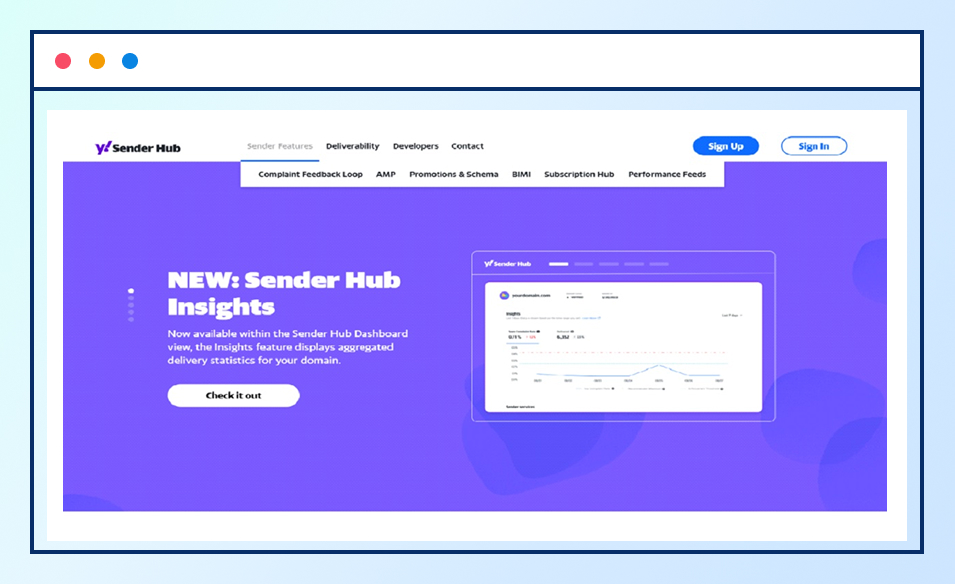
Below are the key features of Yahoo Sender Hub that help senders monitor email performance and improve deliverability.
Complaint Feedback Loop
The Complaint Feedback Loop allows senders to receive reports when recipients mark their emails as spam. This feature helps businesses quickly identify opportunities to improve campaigns, remove complaining recipients from mailing lists, and optimize who they target and how often, helping maintain a healthier sender reputation.
AMP for Email
AMP for Email allows senders to create interactive email experiences directly within the inbox. With AMP, recipients can browse the latest offers, fill out interactive forms, and purchase products without leaving the email. It uses AMPHTML components to enable dynamic content and real-time interactions within the message, creating a more engaging experience for users.
Promotions & Schema
Promotions and Schema allow senders to enhance emails using structured data and schema markup. By embedding structured data in the email markup, mailbox providers can better understand and display the message content. This helps emails stand out in the inbox and allows senders to highlight offers, deals, and product information in a more organized and visually enhanced format.
BIMI (Brand Indicators for Message Identification)
BIMI allows brands to display their verified logo next to their emails in the inbox when messages are properly authenticated. This helps businesses control how their brand appears in email applications, improve brand recognition, and make it easier for recipients to identify legitimate emails from trusted senders.
Subscription Hub
The Subscription Hub provides a centralized place for users to manage their email subscriptions. It allows recipients to easily view, subscribe, or unsubscribe from brand communications in one place. This helps senders maintain a more engaged audience while giving users better control over the emails they receive.
Performance Feeds
Best Practices to Improve Inbox Placement with Yahoo Sender Hub
Sender Hub provides insights into deliverability signals such as spam complaints and engagement. These insights help senders identify potential issues and follow recommended sending practices that improve inbox placement.
For a deeper understanding of how list hygiene and sender reputation influence deliverability across mailbox providers, you can also refer to our Complete Guide to Email List Hygiene.
Authenticate Your Emails
Email authentication helps mailbox providers verify that messages are sent from legitimate sources. Authentication standards such as SPF, DKIM, and DMARC confirm that the sending domain is authorized to send emails. Proper authentication builds trust with mailbox providers and helps support more consistent inbox placement.
Keep Spam Complaint Rates Low
Spam complaints are one of the most important signals mailbox providers use to evaluate sender reputation. When recipients mark emails as spam, it indicates that the message was unwanted or unexpected. Monitoring complaint rates and identifying the reasons behind complaints can help maintain a healthier sending reputation.
Yahoo recommends keeping spam complaint rates below 0.3%, as higher complaint levels may lead to emails being filtered into spam folders or temporarily blocked. Maintaining a low complaint rate helps signal that recipients expect and value the emails they receive.
Use Clear Opt-In Subscription Methods
Sending emails only to recipients who have clearly agreed to receive them helps maintain stronger engagement and lower complaint rates. Using confirmed or double opt-in ensures that email addresses are added to the mailing list with clear user consent. This helps build a more engaged audience and supports better deliverability by reducing the chances of recipients marking messages as spam.
Make Unsubscribing Easy
Providing a clear and visible unsubscribe option allows recipients to easily stop receiving emails they no longer want. Supporting one-click unsubscribe functionality and promptly processing opt-out requests helps reduce spam complaints and supports responsible email sending practices.
Maintain a Clean Email List
Keeping your email list clean is important for maintaining good deliverability. Regularly removing invalid or disposable email addresses helps maintain healthier engagement levels and prevents negative signals that may affect sender reputation and inbox placement.
Using a bulk email validator can help identify invalid, temporary, or disposable email addresses before sending campaigns, making it easier to maintain a high-quality email list.
If you want to learn more about how bulk email verification supports deliverability, you can read our guide on improving deliverability with bulk email verification.
Setting Up Yahoo Sender Hub and Verifying Your Domain
To access domain-level performance data in Yahoo Sender Hub, senders must first verify their sending domain. This verification confirms that you have administrative control over the domain and allows Yahoo to display aggregated delivery insights for emails sent from that domain.
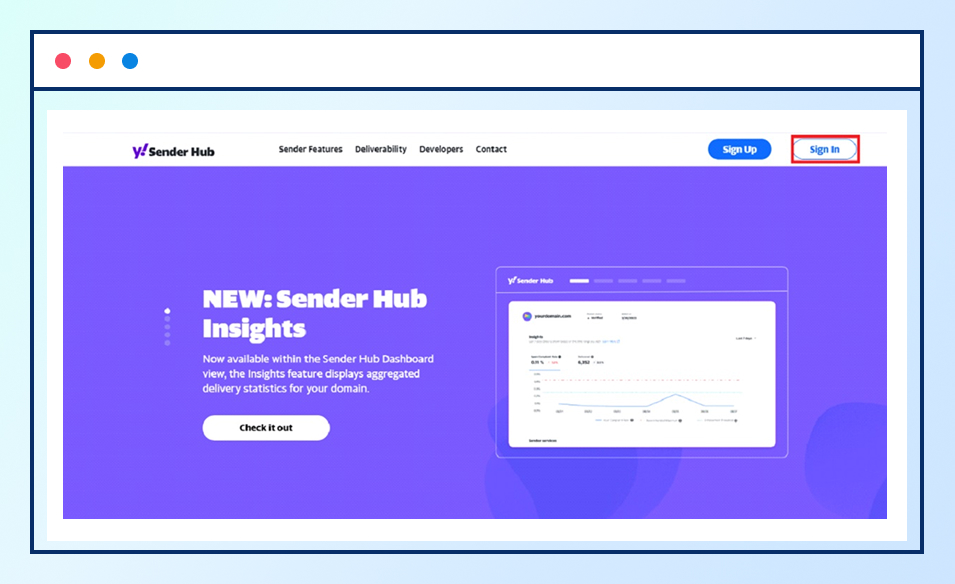
Step 1: Visit Yahoo Sender Hub
Go to senders.yahooinc.com and create or sign in to your Yahoo account.
Step 2: Add Your Sending Domain
Add the domain used to sign your emails with DKIM authentication. Yahoo Sender Hub tracks performance based on the DKIM-authenticated domain, so the domain you add should match the domain configured in your DKIM settings.
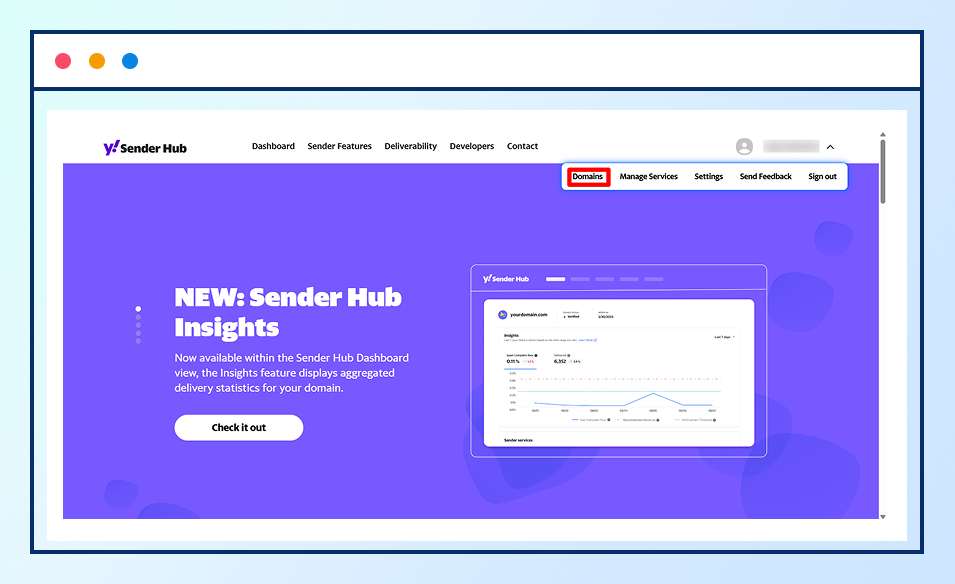
After signing in, navigate to the Sender Hub dashboard and select the option to add a new sending domain.
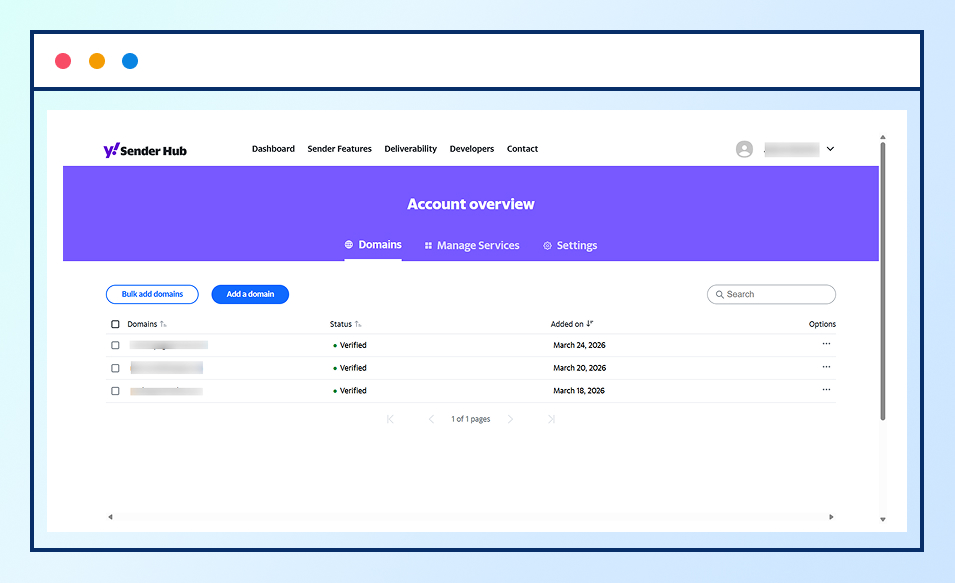
Enter the domain you use for sending emails. This should match the domain configured in your DKIM settings.
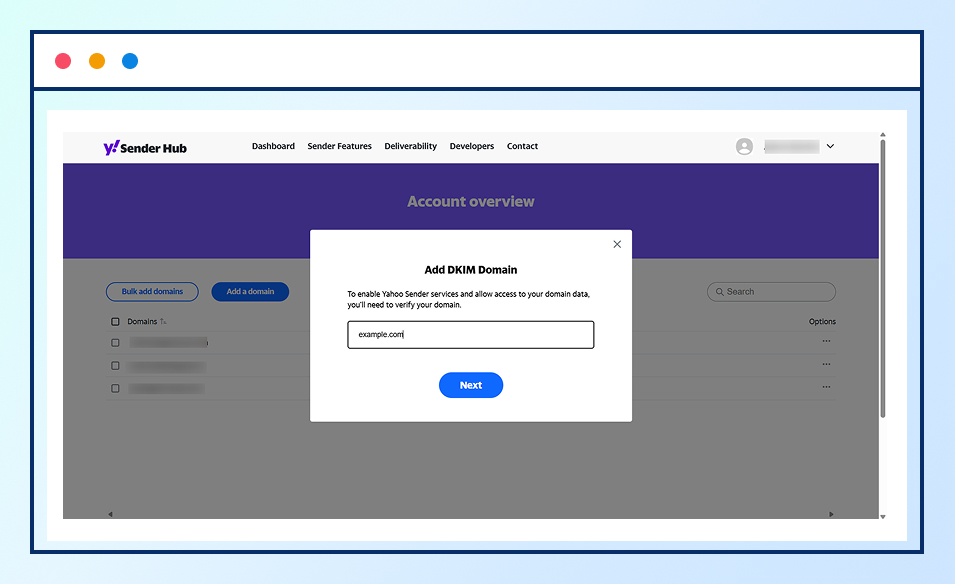
Submit the domain and proceed to the verification step provided by Yahoo.
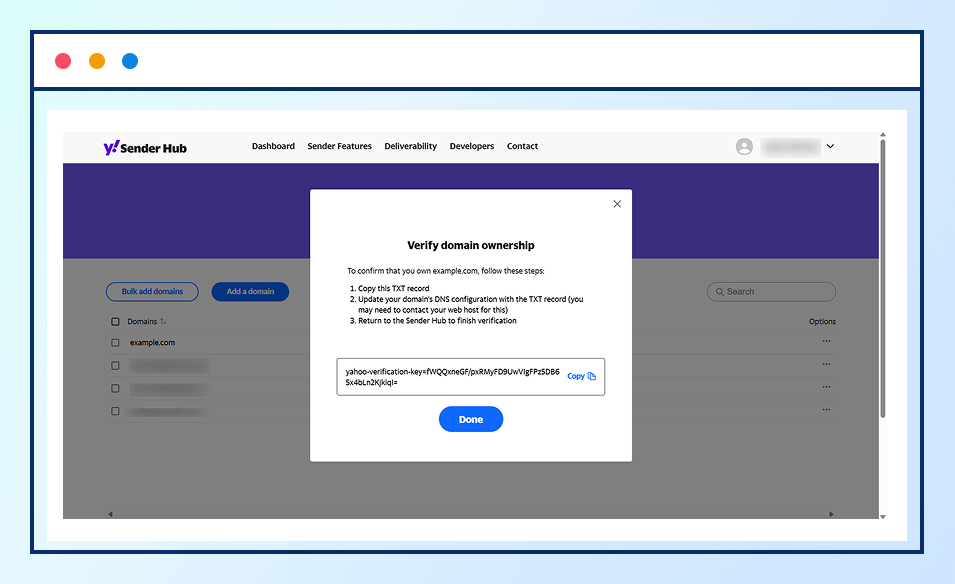
Step 3: Verify Domain Ownership
Yahoo will provide a DNS TXT record that must be added to your domain’s DNS configuration. Once the record is detected, the domain will be verified and linked to your Sender Hub account.
Step 4: Enable Insights and Wait for Data
After verification, the Insights dashboard can begin displaying performance metrics for the verified domain. Data typically appears once Yahoo processes enough email volume from that domain, which may take 24–48 hours or longer depending on sending activity.
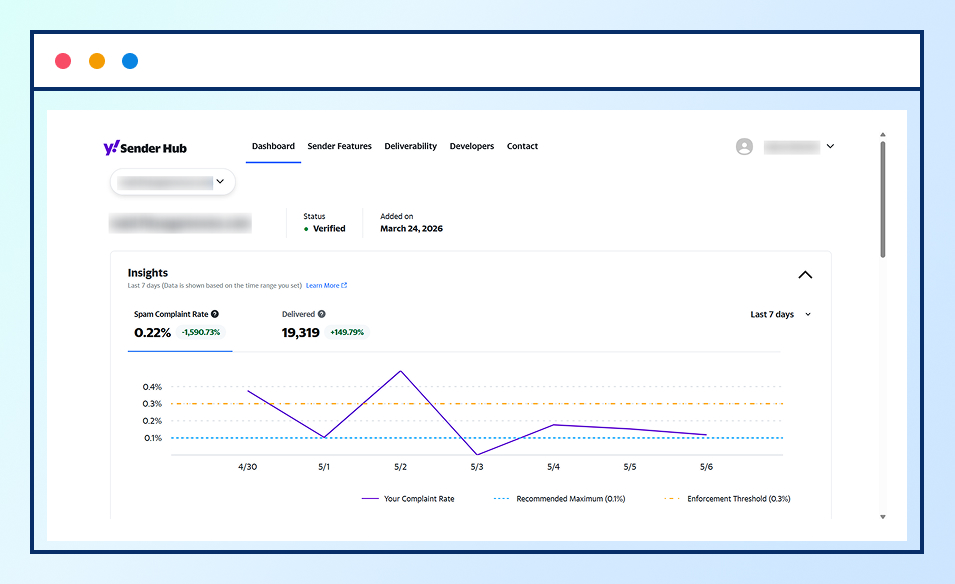
Step 5: Monitor Delivery Insights
Once data becomes available, the Insights dashboard displays aggregated delivery metrics such as:
- Spam Complaint Rate
- Delivered Message Volume
These metrics help senders identify potential deliverability issues and monitor how their emails perform across Yahoo-managed domains.
Bottom Line
Understanding where your emails actually land is essential for maintaining strong email performance. A message being accepted by a receiving server does not guarantee inbox placement, and without proper visibility, it can be difficult for marketers to identify why campaigns underperform.
Yahoo Sender Hub helps close this gap by providing domain-level insights into how emails are handled within Yahoo Mail and AOL Mail environments. Through metrics related to spam complaints, inbox and spam placement, and campaign performance, senders can better understand how their email programs are perceived by mailbox providers.
By regularly monitoring these insights and following recommended sending practices, businesses can identify potential deliverability issues early, improve sender reputation, and increase the emails reach inboxes rather than spam folders.